14 Reproducible workflows, version control
Process
Share
Data documentation
Methods and technology
We aim to make our data collection and processing workflows transparent, reproducible, and less error-prone. Although field data collection cannot be made entirely reproducible due to inherent heterogeneity in the natural world, we prioritize transparency and minimize errors. The computational part of data processing, however, can and should be completely reproducible. After spending months cleaning and processing data from the first two PFTC courses, we refined our approach and adapted our data processing pipeline. Recognizing the broader value of these Open Science practices, we have integrated these reproducible workflows directly into the course curriculum.
The worked cleaning tutorial is Data curation. Scripts and checks are the next chapters: Code based scripts and Quality control. Comments and the data dictionary are under Document: Well commented code and Data documentation.
14.1 Reproducible workflows
14.2 Version control
The BioSTATS books are an extensive resource for getting started with R and RStudio, working in R, coding, using Rmarkdown, git and GitHub and creating an R package. Git and GitHub are taught in the course (BioSTATS GitHub).

14.3 Standardized protocols
We use standardized protocols to make the data as comparable to other studies as possible. We use the handbook of standard trait data collection (Pérez-Harguindeguy et al. 2013).
14.4 Barcodes
We use barcodes to label and track individual leaf samples. Barcodes are easy to scan using a barcode reader and avoid typos when entering the sample ID to a spreadsheet. Since using the barcodes we have reduced the number of typos in the sample ID significantly. We have created a function that generates a standardized, reproducible list of unique alphanumeric identifiers (e.g., AAA4667, AAB6541; get_PFTC_envelope_code.R). It does this by pairing a sequential three-letter string with a four-digit number generated from a specific mathematical “seed,” ensuring that all researchers on a specific campaign produce the exact same sequence of valid codes.
How the IDs are built is also in The trait wheel.
14.5 Sample envelopes
When the leaves arrive at the lab they enter the first station of the trait wheel: leaf preparation. The leaves are put in a Ziplock bag stapled to an envelope, ensuring it stays water saturated for the measurements. A sticker label is glued to the envelope containing a checklist of information to enter for each sample (e.g. date, site, plot, species, individual nr. etc.), trait values, and check boxes ensuring that each step of the trait wheel are conducted. The labeling is made as efficient as possible and to avoid making errors. We pre-print as much information as we can on the labels, e.g. the month and year for the date, so that only the day has to be manually written. For information that only has a limited number of options we make check boxes (e.g. project) or type all options, which can be circled on the label to avoid writing (e.g. aspect). Finally, for each station a value has to be recorded or a check box has to be ticked. This means if a sample skips a station or gets lost, it is easy to figure out where in the pipeline it got stuck.
Preparing the leaves is in The trait wheel.
14.6 Automated leaf scanning
To calculate the leaf area, leaves are first scanned and then analyzed using ImageJ (Schneider et al. 2012). In early iterations of the course, relying on students’ personal laptops across various operating systems resulted in inconsistent scanning parameters and variable image cropping, which complicated downstream area calculations. To resolve this, we developed a more automated process using Raspberry Pis to control the scanners. This ensures consistency and automatically validates both the scanning settings and sample IDs. The complete Raspberry Pi setup guide can be found here: pi_setup.
The course notes are Measure leaf area using a scanner and Raspberry Pi setup.
14.7 Data entry and validation
The data is digitized as one of the last steps. We use a google sheet, where multiple people can enter data at the same time. Because you can see where other users are entering data, the danger of entering data in the same cell is limited. We use validation criteria in the data sheet to avoid errors. We use drop-down menus for values with limited options (e.g. site name) or that are prone to typos (e.g. species names). For trait values we use ranges with allowed values (e.g. above zero, or max range) that can avoid typos or unit issues.
Data entry on the trait wheel is in The trait wheel.
14.8 Data cleaning and processing
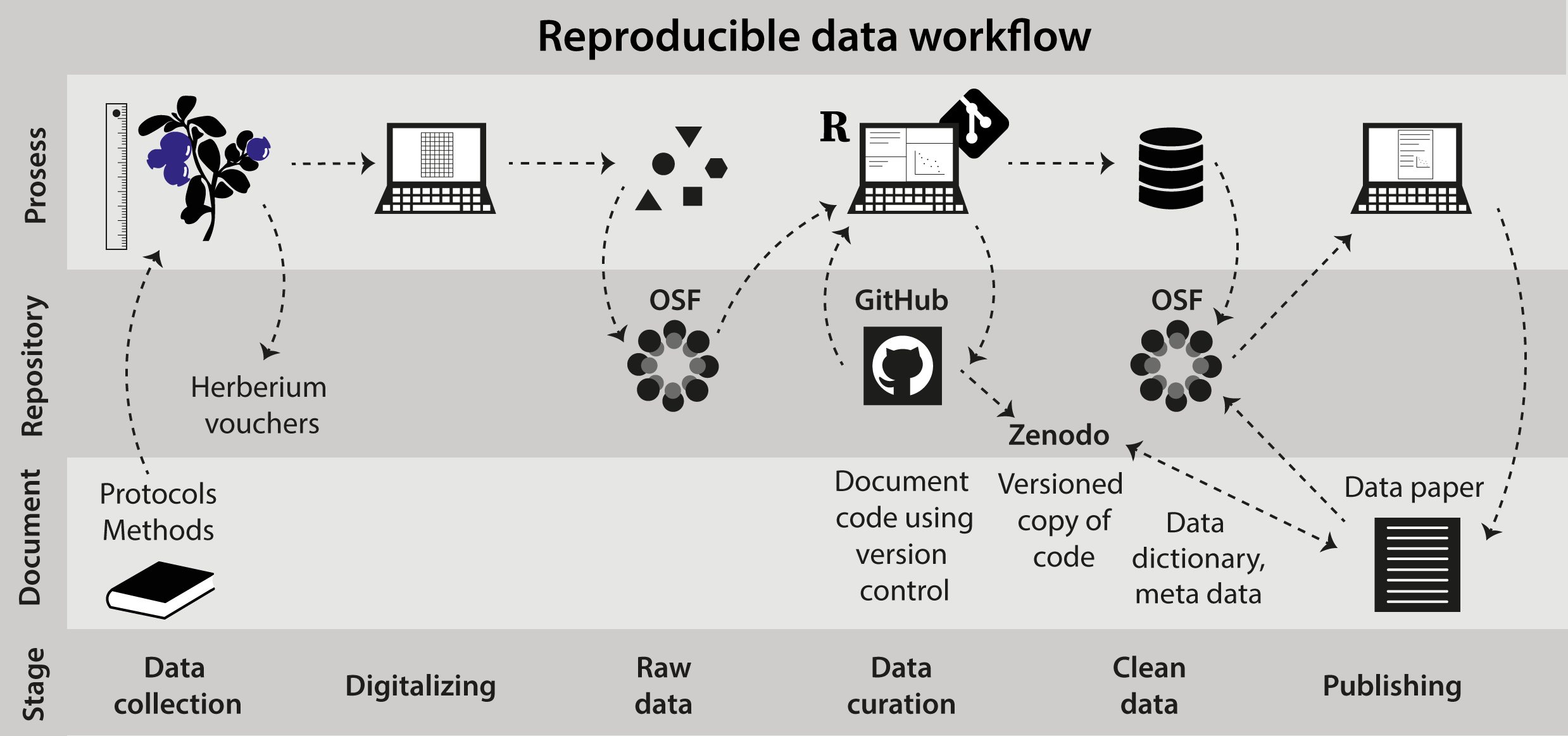
Data cleaning and processing is done entirely code based. Once the data is digitized, the raw data file is not touched anymore. We deposit the raw data file in a data repository. The file is then downloaded via code to the local computer. We use code to clean and process the data. The code is version controlled using Git/GitHub. The clean version of the data is also uploaded on a data repository (e.g. Zenodo, OSF).
Make sure the datasets speak to each other! E.g. variable names are the same, descriptive variable and file names.
The tutorials from import to analysis are Data curation, Plant community composition data, Plant functional trait data, and Bootstrapping trait data.
The write-up of protocols, code, the data dictionary, and metadata is in Data documentation.